Automating TV Shows
Level: 🔵 Intermediate · Time: ~60 minutes
The goal: a show you never think about again. New episodes arrive on their own. Old gaps fill themselves in. You find out by opening the library and seeing the gaps gone.
Overview
There are two directions and you want both.
Forward acquisition (RSS) catches tonight's episode minutes after it is posted. Backward acquisition (watchlist + Missing Episodes) fills in the 43 episodes you never had. Neither one does the other's job.
Purpose
By the end you will have:
- A series monitored on the watchlist, with an accurate missing-episode count.
- Missing episodes searched for and grabbed — manually first, then automatically.
- An RSS rule catching new episodes as they appear.
- Certainty about what will happen when the show eventually ends.
When to use this tutorial
| Use it when… | Use something else when… |
|---|---|
| You want a show fully automated. | You want movies → Building a movie library. |
| You want to see which episodes you are missing. | You want to tune quality preferences → Smart RSS rules. |
| You want gaps filled without you searching. | You have no indexers yet → Multiple indexers. |
Prerequisites
- A working TV library (
kind: tv) whose items are identified — see Building a movie library, which applies identically to TV. - At least one indexer that passes its Test (
/indexers). - The
media_acquisition_intelligencemodule enabled. - Permissions:
media_acquisition.view,media_acquisition.manage_watchlist,media_acquisition.evaluate;rss.view,rss.manage. - An IMDb episode catalogue — see the warning below. This is the one that stops people.
The "what episodes should exist" set comes from your local IMDb episode mirror. That mirror is only populated when the IMDb import runs with Import TV series & episodes enabled. A movies-only import has no episodes to diff against — the page will simply show nothing missing, forever, and you will think it is broken.
Configure this on Media Management → IMDb Settings (/media/settings/imdb)
before you go further.
Concepts
| Term | Meaning |
|---|---|
| Watchlist item | A thing you want: movie / series / season / episode. |
| Monitored | On the watchlist with an IMDb ID. Without one, a series is not monitorable. |
| Wanted episode | A computed row per catalogue episode: owned / missing / unaired / ignored. |
searchStatus | idle → searching → grabbed | pending_approval | no_results | failed. |
| Acquisition profile | The policy: minimum score, approval score, upgrades allowed, wait policy. |
| Show status | continuing / returning / planned / on_hiatus / ended / canceled / unknown. |
Step-by-step
Step 1 — Make sure the show is actually in your library, and identified
Go to Media Management → Media Items (/media/items).
Find your show. Confirm:
- It exists as a series (not as 40 separate items, one per episode).
- Its
matchStatusismatchedormanual, notunmatched.
Ownership is decided from MediaItem.season / episode, which come from
filename identification — not from a raw scan. A library of badly named or
unidentified files will over-report missing, and you will end up re-downloading
things you already have.
Re-identify the library before you trust any missing-episode count.
For an episodic layout (Show/Season NN/episode), the series title is taken from
the show folder, not the filename — because the filename often carries only the
episode title. If your files are loose or the folder structure is unusual, that
consolidation cannot happen. Restructure to Show/Season 01/… and rescan.
Expected result: one media item for the series, matched, with seasons and
episodes underneath it.
Step 2 — Monitor the series (the easy way)
Go to RSS & Acquisition → Acquisition Intelligence → Missing Episodes
(/media-acquisition/missing-episodes).
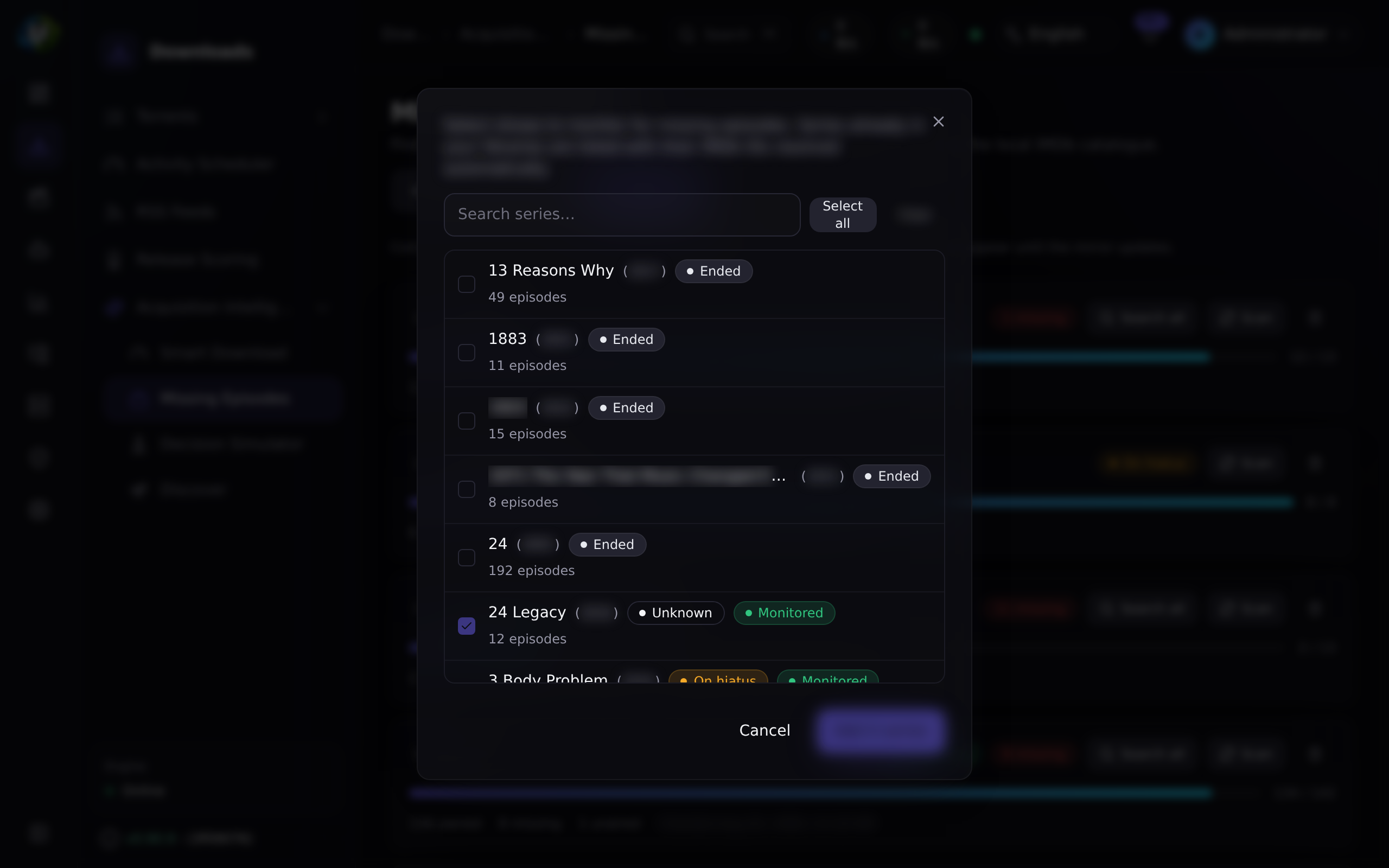
Click Add from library.
This opens a searchable multi-select of the TV series already in your libraries,
with their IMDb IDs resolved automatically (from each show's seriesImdbId, or
from an episode's imdb external ID).
- Series already on the watchlist appear pre-checked and locked.
- Shows with no resolvable IMDb ID are flagged — they are still addable, but you should re-identify the library to make them scannable.
Select your show. Add.
You can — the watchlist add/edit dialog has an IMDb ID field (tt0903747
style). But the picker resolves them for you, in bulk, and does not typo.
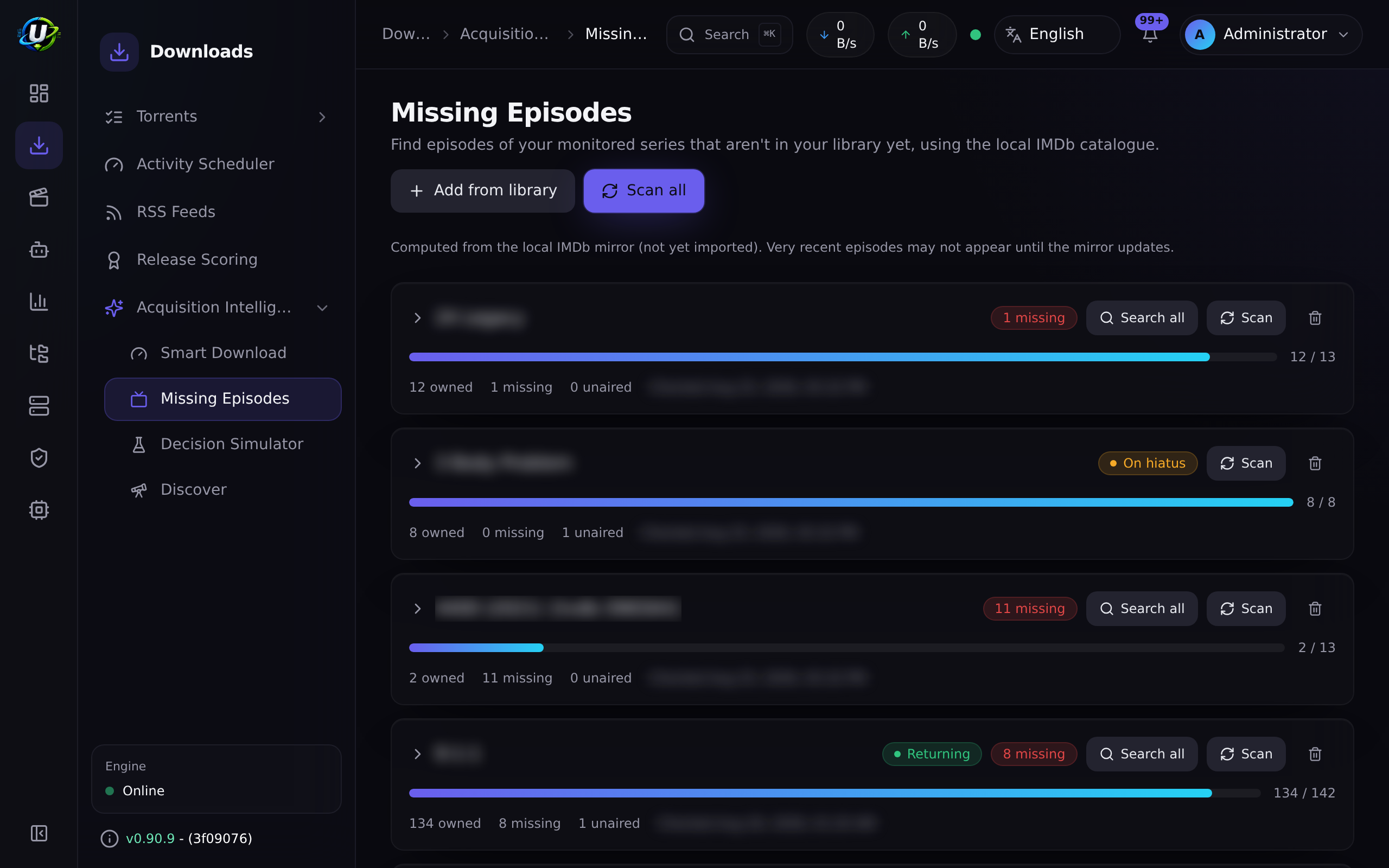
Expected result: the series appears on the Missing Episodes page as a monitored series.
Step 3 — Scan for missing episodes
Click Scan on the series (or Scan all).
The scan:
- Enumerates every episode of the series from the IMDb episode catalogue.
- Works out which ones the library owns — primarily via the structured
seriesImdbIdlink, falling back to a case-insensitive title match if the library has not been re-identified. - Classifies each catalogue episode:
| Status | Meaning |
|---|---|
owned | You have it. |
missing | It aired and you do not have it. This is the acquirable gap. |
unaired | Its air year is in the future or unknown — it cannot be acquired yet. |
ignored | You opted it out. Survives rescans. |
Season 0 (specials) is excluded from the missing maths.
Expected result: per-series counts (owned / total / missing / unaired / ignored) and a season → episode grid you can expand.
Rescanning rebuilds everything except your ignored overrides and the
grab-state (searchStatus, grabbedAt) on episodes already searched. You cannot
lose those by rescanning.
Your catalogue is only as fresh as your last IMDb import, and the optimized import drops episodes with no air date. The page shows the mirror's date. A very recent episode may not appear as missing until you refresh the mirror.
Step 4 — Prune the list before you automate it
Expand the series. Go through the grid and Ignore anything you do not want:
- Specials you do not care about.
- A season you deliberately do not own.
- Episodes that will never have a release.
Ignored episodes drop out of the missing count and survive rescans — so this is a one-time investment, not a chore.
If you enable the sweep against a list full of episodes you never wanted, it will dutifully go and get them. Ten minutes of pruning here saves a lot of disk.
Expected result: the missing count now equals the number of episodes you actually want.
Step 5 — Fill one gap by hand, first
Do not turn automation on yet. Prove the chain works on one episode.
Pick a missing episode and click Search now.
Here is what happens:
Watch the episode's searchStatus badge change: searching → grabbed /
awaiting approval / no release / failed.
Expected result: one of:
| Badge | Meaning | What to do |
|---|---|---|
| grabbed | It is downloading. | 🎉 Go to /torrents and confirm. |
| awaiting approval | The decision engine wants a human. | Approve it in the acquisition Approvals tab. |
| no release | Nothing acceptable found. | See Troubleshooting. |
| failed | The search itself errored. | Check docker compose logs backend. |
searchStatus is preserved across rescans, exactly like your ignored
overrides. A grabbed or pending episode is never re-searched. The state drops
automatically once the episode becomes owned.
There is also Search all per series, if you want to fire the whole backlog by hand.
Step 6 — Now turn on automatic search
Only once Step 5 worked.
The scheduled sweep is opt-in and OFF by default. Enable it in the media acquisition settings:
| Setting | Default | What it does |
|---|---|---|
autoSearchMissing | false | Enables the scheduled sweep. This is the master switch. |
searchIntervalMinutes | 60 | Per-episode re-search backoff. |
missingSearchProfileId | null | Which acquisition profile to grab with (falls back to the watchlist item's). |
maxSearchesPerSweep | 50 | Caps how many episodes are searched per tick. |
Duplicate-grab safety is layered, so you are not one setting away from disaster:
searchStatusexcludes already-grabbed/pending rows.- A
lastSearchedAtbackoff enforces the cadence. - A re-entrancy guard stops overlapping sweeps.
searchAlldedups candidates cross-indexer by info-hash.- The evaluator's own owned check returns
skipif the library already has it.
Expected result: over the next few sweeps, missing episodes turn grabbed on
their own.
WantedMovie rows carry the same grab-state columns, but automatic search is
episode-only today. Missing movies are detected and listed, but you must
acquire them yourself (or via an RSS rule).
Step 7 — Catch future episodes with an RSS rule
Missing Episodes looks backwards. For tonight's episode you want RSS.
-
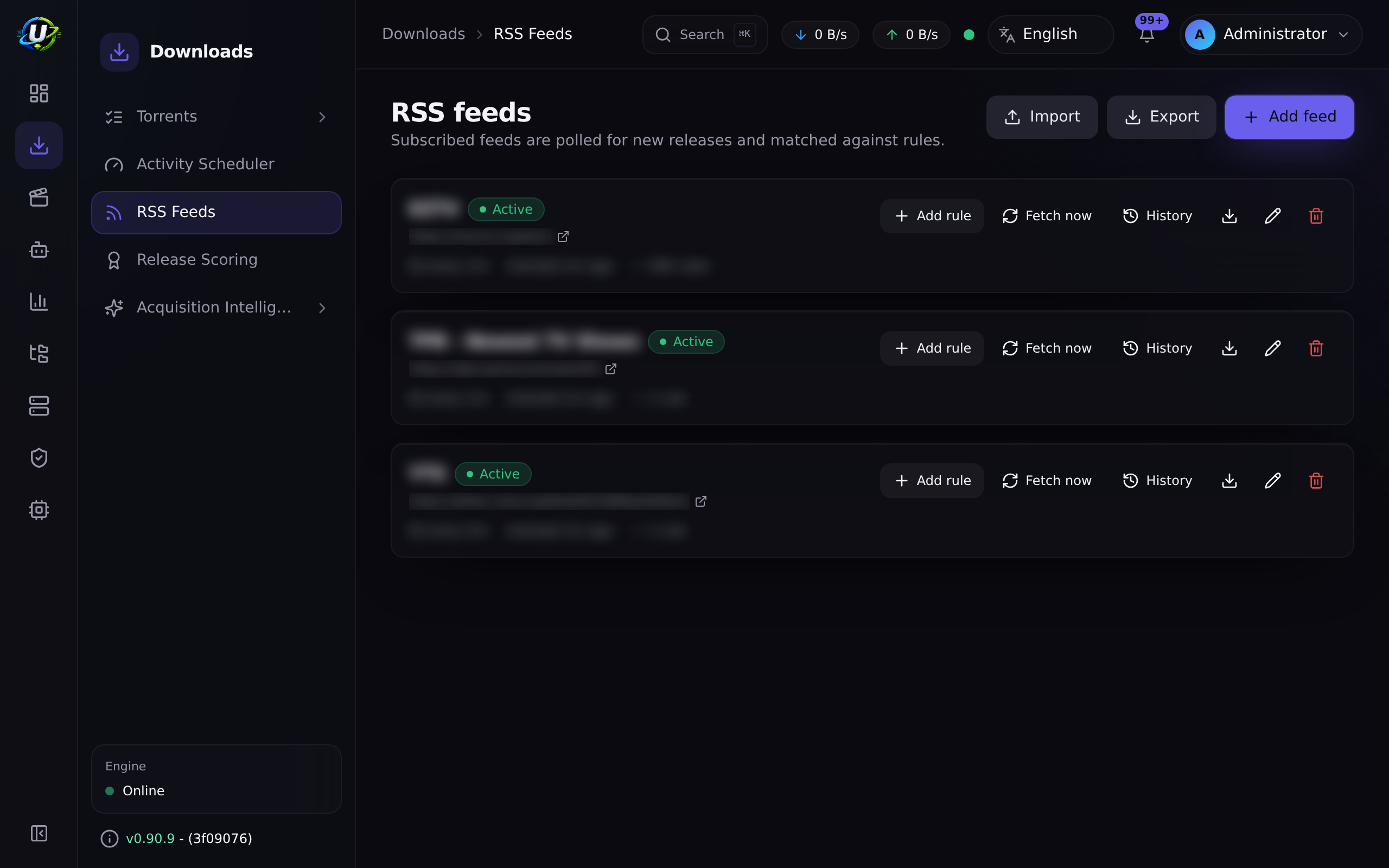
Go to RSS & Acquisition → RSS Feeds (
/rss). -
Add feed — a URL and a refresh interval. The
rss_polljob runs every 60 seconds and fetches feeds whose interval has elapsed. -
Add rule under that feed:
Field Value Name The ExpanseMedia type tv← this is what activates show-status awarenessInclude regex something that matches the show Exclude regex e.g. exclude CAM,HDTS, languages you do not wantSave path /downloads/tv← must be inside your TV library's rootAuto-download on -
Save.
Expected result: the rule is created, and because you set Media type = tv, a live show status panel appears.
Step 8 — Understand the show-status panel
When the media type is tv or anime, UltraTorrent resolves the show's airing
status — server-side, never trusting anything the browser sends — using providers
tried in confidence order:
| Provider | Source | Confidence |
|---|---|---|
| TMDB | /search/tv + /tv/{id} | 0.95 — status, next/last episode, poster |
| IMDb dataset | your local IMDbTitle mirror | 0.6 — ended/continuing, no next-episode granularity |
| Local library | your own MediaItems | 0.3 — best-effort fallback |
The answer is normalized to a status and a recommendation:
| Status | Recommendation |
|---|---|
continuing · returning · planned | ✅ recommended |
on_hiatus | ⚠️ caution |
ended · canceled | ⛔ not recommended |
unknown | ❓ unknown — saved with a status_unconfirmed warning |
Monitoring a canceled show forever just wastes polling. If you try to save a TV rule
for an ended or canceled show, the save is rejected (400) and a confirmation
modal appears. Confirming sets allowInactiveShowMonitoring — and that override is
audited.
If what you actually want is to backfill an old show rather than monitor it forward, the right move is a rule with auto-download OFF, plus the watchlist + Missing Episodes flow from Steps 2–6.
Expected result: a status badge, a recommendation banner, the provider and its confidence, next/last-episode dates, and a poster — before you save.
Step 9 — Build the quality preferences
Open the rule's detail page (/rss/rules/:ruleId). This is where the Smart Match
Builder and Match Preferences live.
Do not try to express quality with regex. Build a ranked preference list instead — "2160p Dolby Vision first, 1080p WEB-DL second, never a CAM" — and the engine will hold one release per episode, upgrade to a strictly better one if it appears, and skip anything equal or worse.
That is covered properly in Smart RSS rules. For now, a simple list is fine.
Expected result: the rule's Match Preferences list is ordered the way you want.
Step 10 — What happens when the show ends
A background job (rss_show_status_refresh) re-resolves cached show statuses on a
per-status cadence:
| Status | Re-checked every |
|---|---|
| active | 24 hours |
on_hiatus | 7 days |
ended / canceled | 30 days |
unknown | 3 days |
When a show's status changes, it updates every rule that snapshotted that show,
emits rss.show_status.changed plus the specific transition
(rss.show.ended / .canceled / .became_active), and audits it.
Surfacing the change is the platform's job. Deciding what to do about it is yours.
If you want it automated, build an automation rule on the rss.show.ended
trigger with an action like convert_rule_to_backfill (which turns off
auto-download but keeps the rule) or disable_rss_rule.
Expected result: you find out when a show ends, and you decide what happens next.
Video coming soon.
Examples
The full setup for one show
| Piece | Where | Setting |
|---|---|---|
| Library | /media/libraries | /downloads/tv, kind tv, preset plex, mode hardlink, scan 360 |
| Watchlist | /media-acquisition → Watchlist | Series, with IMDb ID (via Add from library) |
| Backfill | /media-acquisition/missing-episodes | Scan → prune with Ignore → Search all |
| Auto-backfill | acquisition settings | autoSearchMissing: true, maxSearchesPerSweep: 50 |
| Forward | /rss → rule | Media type tv, save path /downloads/tv, auto-download on |
| Quality | /rss/rules/:id | A ranked Match Preferences list |
| When it ends | /automation | Trigger rss.show.ended → action convert_rule_to_backfill |
An automation rule for the day it ends
TRIGGER    rss.show.ended
CONDITIONS (none — apply to every show)
ACTIONS    convert_rule_to_backfill   ← keep the rule, stop forward grabbing
Troubleshooting
| Symptom | Cause | Fix |
|---|---|---|
| Missing Episodes shows nothing at all | The IMDb import ran movies-only. | Re-import with Import TV series & episodes enabled (/media/settings/imdb). |
| Series shows as not monitorable | No IMDb ID on the watchlist item. | Use Add from library, or set the IMDb ID by hand. If it cannot resolve, re-identify the library. |
| It says I am missing episodes I definitely have | Library items are unidentified, so ownership cannot be proven. | Re-identify the library. Clear /media/unmatched. |
Everything shows as unaired | The catalogue has no air year for those episodes. | The mirror lags IMDb — refresh the import. |
Search now → no release | (a) The show's scene title does not parse to your watchlist title (an alias). (b) No indexer carries it. (c) minSeeders filtered everything out. | Check the indexer directly; lower minSeeders; confirm the title matches how releases actually name the show. |
Search now → failed | The indexer errored. | Test the indexer (/indexers); check docker compose logs backend. |
Everything lands in pending_approval | Your profile forces approval, or the score is below approvalScore. | Adjust the acquisition profile, or approve them. |
| Grabbed, but the file never appears | The grab's save path is outside your TV library root, so the media pipeline never ran. | Fix the rule's save path / the profile's path. |
| RSS rule will not save | The show is ended/canceled. | Confirm the override (audited), or build a backfill rule with auto-download off. |
| The rule grabs then deletes what it grabbed | An upgrade: a strictly higher-priority release appeared. | Working as designed. Adjust your preference list if you disagree. |
| Auto-search never runs | autoSearchMissing is false — the default. | Turn it on. |
| Torrent URL blocked | SSRF guard vs. a private-IP indexer. | Add the host to SSRF_ALLOW_HOSTS (keep prowlarr). |
Tips
Running Search all manually on one series teaches you more about your indexers, your profile and your preference list in ten minutes than a week of the sweep running quietly in the background.
Paste the release name into /media-acquisition/simulator and read the trace. It
tells you exactly which stage rejected it — with zero side effects.
maxSearchesPerSweep sensiblyThe default of 50 is per tick. If you just added six seasons of five shows, that
is a lot of indexer traffic. Some indexers rate-limit; some ban. Start small.
It consumes the RSS module's Smart Match preference lists and the Release Scoring engine as the source of truth. Tune quality in one place and both paths obey it.
FAQ
Do I need both an RSS rule and the watchlist? For a currently-airing show, yes — they cover opposite directions in time. For a finished show you only want the watchlist + Missing Episodes.
What if a show is known by a different name on my indexer? A candidate only matches when its scene title parses to the show name. A show under a substantially different alias may find nothing — the release is skipped rather than mis-grabbed, which is the safe failure. Handle that show with an RSS rule whose include regex matches the alias.
Can it grab season packs?
Indexer search for missing episodes filters candidates to the exact SxxEyy. An
RSS rule can match whatever its regex and preference list allow.
Will it re-download an episode I already have in worse quality?
Only if your profile permits upgrades (duplicateRules.allowUpgrades) and the
new release wins on a real upgrade dimension — resolution, source, HDR, audio,
channels. A codec change alone (x264 → x265) never triggers an upgrade.
What is wait and why is nothing downloading?
Your profile's wait policy (waitForBetter + waitUntilScore) is deliberately
holding out for something better. See the Waiting queue on the Smart Download
dashboard.
Where do I see what Smart Download decided? On the dashboard queues, and in the decision trace for any release you paste into the Decision Simulator. Smart Download automation triggers are not yet implemented.
Checklist
Verification
- The IMDb import ran with TV series & episodes enabled.
- The show exists as one media item in a
tvlibrary,matched. - It is on the watchlist with an IMDb ID (via Add from library).
- A scan produced sensible owned / missing / unaired counts.
- I pruned the list with Ignore.
- One episode was filled by Search now and reached
grabbed. - That torrent appeared on
/torrentsand completed. - It was renamed into the TV library automatically.
-
autoSearchMissingis on, with a sanemaxSearchesPerSweep. - An RSS rule exists with Media type = tv and a save path inside the TV library root.
- The show-status panel showed recommended.
- I know what will happen when the show ends.
Expected results
| Screen | Expected |
|---|---|
/media-acquisition/missing-episodes | Accurate counts; grabbed badges appearing over time |
/torrents | Episodes arriving without you |
/media/items | The series growing, all matched |
/rss/rules/:id | A ranked preference list, and a green show-status badge |
Next steps
- Smart RSS rules — make the quality decisions properly.
- Multiple indexers — more sources = more gaps filled.
See also
- Missing Episodes · Smart Download
- RSS · Indexers · Media Manager
- Workflows — Workflows 2 and 4 are this tutorial, as diagrams.
- Core Concepts — watchlist, wanted episode, upgrade dimensions.
- Automation · Troubleshooting