Install with Docker Compose
Overview
This is the UltraTorrent install guide. Every platform page in this section is a thin delta on top of it — different shell, different paths, different port clashes, same stack.
You will:
- Get the source onto the host.
- Generate five secrets into a
.envfile. - Build and start the stack (
docker compose up -d --build). - Seed the database, once.
- Log in, add a torrent engine, and verify.
Video coming soon.
Prerequisites
| You need | Why |
|---|---|
| Docker Engine (any recent release) | Runs the stack |
Docker Compose v2 — the docker compose plugin, not the legacy docker-compose script | The Compose file uses profiles and condition: service_healthy |
git (or the ability to download and unzip a ZIP) | There are no published images — you build from source |
openssl (or any strong random generator) | Generating secrets |
| Shell access to the host | Building and the one-time database seed |
Check what you have:
docker --version
docker compose version     # must print v2.x — if it errors, install the Compose plugin
Requirements
| Resource | Minimum | Comfortable |
|---|---|---|
| CPU | 2 cores (x86-64 or ARM64) | 4 cores |
| RAM | ~2 GB free during the build | 4 GB+ (Postgres + Redis + Node + an engine) |
| Disk — the stack | ~2–3 GB for images and volumes | plus headroom for docker image prune laziness |
| Disk — downloads | As much as your library needs | on a separate, large filesystem |
| First build | 10–15 minutes | seconds on every start after that |
The build is the memory-hungry part (it compiles the backend and the SPA). A host with 1 GB of RAM will typically OOM during the frontend build.
Ports
Only the web UI is published by default.
| Port (host) | Service | Published by default? | Change with |
|---|---|---|---|
| 8080 | frontend — the web UI (nginx, listening on 8080 inside the container) | ✅ Yes | FRONTEND_PORT |
| 4000 | backend — REST API + WebSocket gateway | ❌ No — internal only; the frontend proxies /api/ and /ws/ to it | add a ports: mapping if you really want direct API access |
| 5432 | postgres | ❌ No — internal only | — |
| 6379 | redis | ❌ No — internal only | — |
| 5000 | rtorrent SCGI (profile rtorrent) | ❌ No — internal only | — (never publish it: SCGI is unauthenticated and grants full control) |
| 8081 | qbittorrent Web UI (profile qbittorrent) | ✅ Yes, when the profile is on | QBITTORRENT_PORT |
| 9696 | prowlarr (profile prowlarr) | ✅ Yes, when the profile is on | PROWLARR_PORT |
| 8191 | flaresolverr (profile flaresolverr) | ❌ No — internal only | — |
| 80 / 443 | proxy — bundled Caddy (profile proxy) | ✅ Yes, when the profile is on | edit docker-compose.yml |
The bundled rTorrent listens for peers on 6890-6999 inside the container, and the shipped Compose file does not publish that range to the host. Downloads still work (outbound connections are unaffected), but you will not accept inbound peer connections. To change that, publish the range yourself in an override file and forward it on your router — see Optional: accept inbound peers.
Volumes
| Volume | Used by | Holds |
|---|---|---|
postgres_data | postgres | The database. Back this up. |
redis_data | redis | Redis AOF (cache + job queues) — regenerable |
downloads | backend, rtorrent, qbittorrent | The shared download tree, mounted at the same path (/downloads) in every container so engine save-paths line up with FILE_MANAGER_ROOTS. rTorrent's session state lives here too, at /downloads/.session. |
prowlarr_config | prowlarr | Prowlarr's database, indexer definitions, API key |
qbittorrent_config | qbittorrent | qBittorrent settings and its own torrent state |
caddy_data | proxy | Caddy certificates and ACME state |
All of them are Docker-managed named volumes by default. Downloads is the one you almost certainly want to redirect to a real folder — see Point downloads at a real folder.
Permissions
Three different users are in play:
| Container | Runs as | Notes |
|---|---|---|
backend | node, uid 1000 | Its file-manager actions (create/move/delete) happen as this user |
frontend | nginx-unprivileged, uid 101 | Serves static files only — no shared volumes |
rtorrent | PUID:PGID, default 1000:1000 | The entrypoint starts as root, then drops privileges with gosu |
qbittorrent | PUID:PGID, default 1000:1000 | LinuxServer image convention |
PUID / PGID decide who owns your downloaded files. Defaults (1000:1000) match the backend, which is what you want when UltraTorrent owns the folder.
If your download folder is owned by another application's user — the classic case is a Plex-owned media share — do not chown it to 1000; that breaks Plex. Instead, make the engine write as that user:
id plex # e.g. uid=1001(plex) gid=1001(plex)
# .env
PUID=1001
PGID=1001
docker compose --profile rtorrent up -d rtorrent
The bundled rTorrent entrypoint deliberately only claims /downloads when it is a brand-new, root-owned, unclaimed volume — a folder already owned by a real user is left untouched. Pointing it at a Plex-owned share is safe.
Optional — let the in-app File Manager write there too. The backend still runs as uid 1000, so its write actions on a Plex-owned folder are limited until you add it to that group:
sudo chmod -R g+rwX /path/to/downloads
sudo find /path/to/downloads -type d -exec chmod g+s {} +   # new files inherit the group
# docker-compose.override.yml
services:
  backend:
    group_add: ["1001"]     # plex's GID
Skip this and downloading still works fully; only the File Manager's write actions on that folder are restricted (and you get a "cannot write to this path" warning when setting the Default Root Path — a warning, not a blocker).
Step-by-step
1. Get the source
git clone https://github.com/ultratorrentofficial/ultratorrent.git
cd ultratorrent
No git? Download the repository ZIP from GitHub, extract it on the host, and cd into it.
2. Generate your secrets
Copy the template:
cp .env.example .env
There are no insecure defaults. The stack refuses to start until you set POSTGRES_PASSWORD and ADMIN_PASSWORD, and the backend refuses to boot in production unless JWT_ACCESS_SECRET, JWT_REFRESH_SECRET and ENCRYPTION_KEY are set, at least 32 characters, not a known default — and ENCRYPTION_KEY must differ from JWT_ACCESS_SECRET.
Generate one secret at a time:
openssl rand -base64 48 # run once per secret — they must all differ
…or fill all three random keys in one go, then set the two passwords by hand:
for k in JWT_ACCESS_SECRET JWT_REFRESH_SECRET ENCRYPTION_KEY; do
  sed -i "s|^$k=.*|$k=$(openssl rand -base64 48 | tr -d '\n')|" .env
done
Compose derives DATABASE_URL from POSTGRES_USER / POSTGRES_PASSWORD / POSTGRES_DB. A URL-special character (@, :, /, #, ?) in the password breaks that derived connection string. Use letters and numbers only.
3. Fill in the .env
A minimal, working .env — everything else has a sane default:
# ---- Required ------------------------------------------------------------
POSTGRES_PASSWORD=alphanumericPasswordHere123     # letters + numbers ONLY
ADMIN_PASSWORD=the-password-you-will-log-in-with  # this is YOUR login password

JWT_ACCESS_SECRET=<openssl rand -base64 48>
JWT_REFRESH_SECRET=<openssl rand -base64 48>
ENCRYPTION_KEY=<openssl rand -base64 48>          # MUST differ from JWT_ACCESS_SECRET

# ---- Commonly changed ----------------------------------------------------
FRONTEND_PORT=8080            # the ONLY port published by default; change if 8080 is taken
CORS_ORIGIN=http://localhost:8080
ADMIN_USERNAME=admin          # you log in with this USERNAME, not the email
ADMIN_EMAIL=admin@ultratorrent.local
TZ=Etc/UTC                    # timezone for the bundled companion containers

# ---- Downloads / permissions --------------------------------------------
FILE_MANAGER_ROOTS=/downloads # comma-separated absolute roots the file browser may touch
# PUID=1000                   # who owns downloaded files (see Permissions above)
# PGID=1000

# ---- Optional bundled engines / companions -------------------------------
QBITTORRENT_PORT=8081         # only used with --profile qbittorrent
PROWLARR_PORT=9696            # only used with --profile prowlarr
PROWLARR_BASE_URL=http://prowlarr:9696
PROWLARR_PUBLIC_URL=http://localhost:9696
# RT_DHT=off                  # bundled rTorrent: DHT is OFF by default (it can crash this build)
# SSRF_ALLOW_HOSTS=prowlarr   # hosts whose .torrent links may resolve to a private IP
.envIt contains your database password, your admin password, and the keys that sign every session token and encrypt every stored 2FA secret. See Security.
The full, generated list of every variable UltraTorrent reads lives at Environment variables.
4. Point downloads at a real folder
By default, downloads land inside a Docker-managed volume you cannot easily browse. To send them to a normal folder, create docker-compose.override.yml next to docker-compose.yml:
# docker-compose.override.yml
volumes:
  downloads:
    driver: local
    driver_opts:
      type: none
      o: bind
      device: /srv/downloads        # a real, EXISTING folder on the host
Create the folder first (mkdir -p /srv/downloads) — Docker will not create it for you, and the bind will fail if it does not exist.
Compose appends ports: entries rather than replacing them, so an override adds a second mapping and the original one still conflicts. Change FRONTEND_PORT in .env instead.
5. Build and start
- Bundled rTorrent (default)
- Bundled qBittorrent (large libraries)
- My own engine
- Everything
docker compose --profile rtorrent up -d --build
The first build takes several minutes — that is normal. Let it finish.
docker compose --profile qbittorrent up -d --build
Then get the first-run temporary password and set your own:
docker compose logs qbittorrent | grep -i password
Open http://<host>:8081, log in as admin with that temporary password, and set a real username/password under Options → Web UI.
docker compose up -d --build
No profile — no bundled engine. Register your existing rTorrent or qBittorrent later under Infrastructure → Engines.
docker compose --profile rtorrent --profile prowlarr --profile flaresolverr up -d --build
Profiles stack. Add --profile proxy for the bundled Caddy edge proxy.
6. Seed the database — once
Migrations apply automatically on every backend start (the container's command is prisma migrate deploy && node dist/main.js). Seeding is a separate, one-time step that inserts permissions, the five system roles, the bootstrap admin, and the default settings:
docker compose exec backend npx prisma db seed
The seed is idempotent — re-running it never resets your admin password or touches your data. You will run it again after upgrades, to pick up new permissions.
7. First login
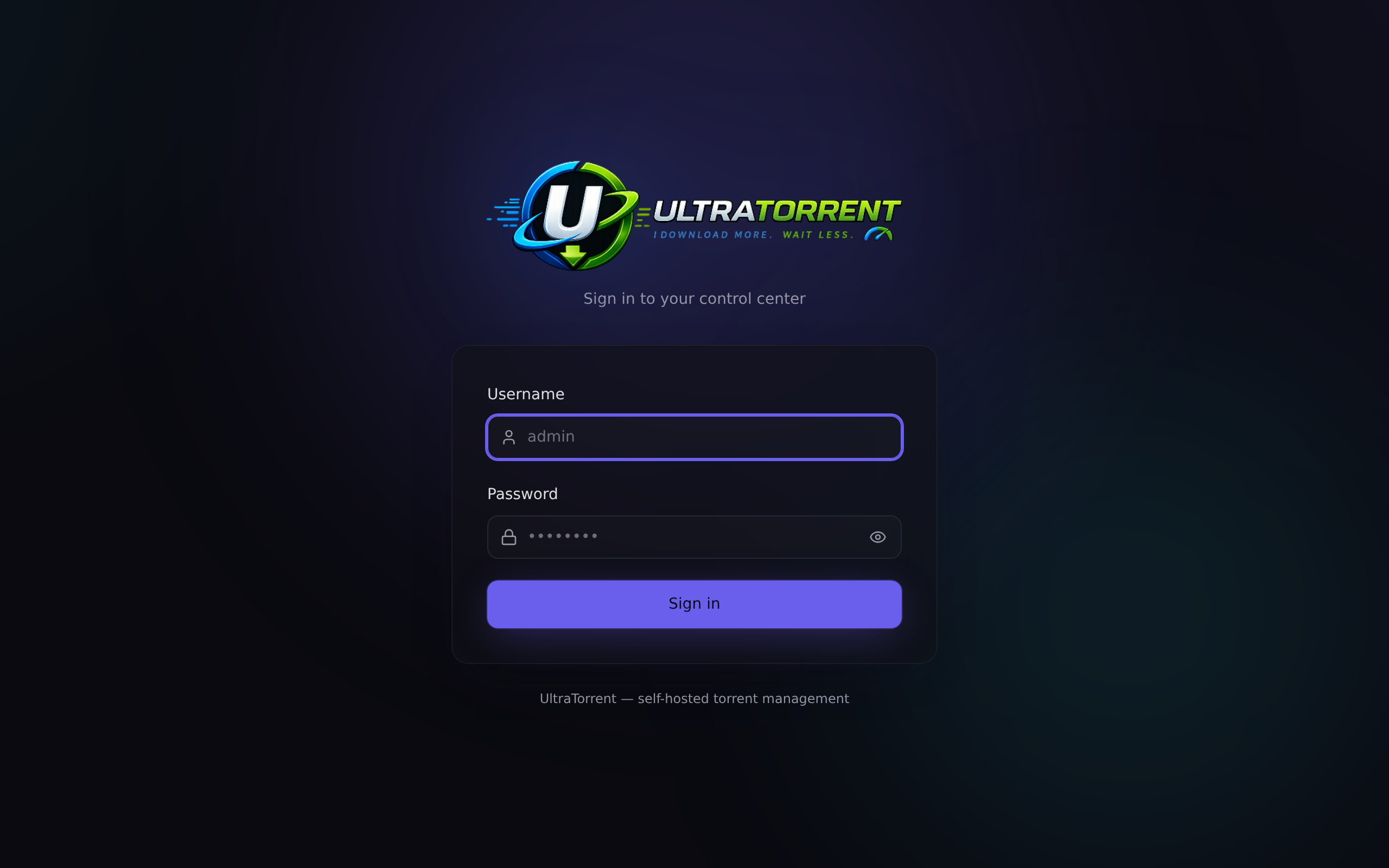
Open http://<host>:8080 (or whatever FRONTEND_PORT you chose).
- Username:
admin— it is a username, not an email address. - Password: the
ADMIN_PASSWORDyou set in.env.
8. Add the torrent engine
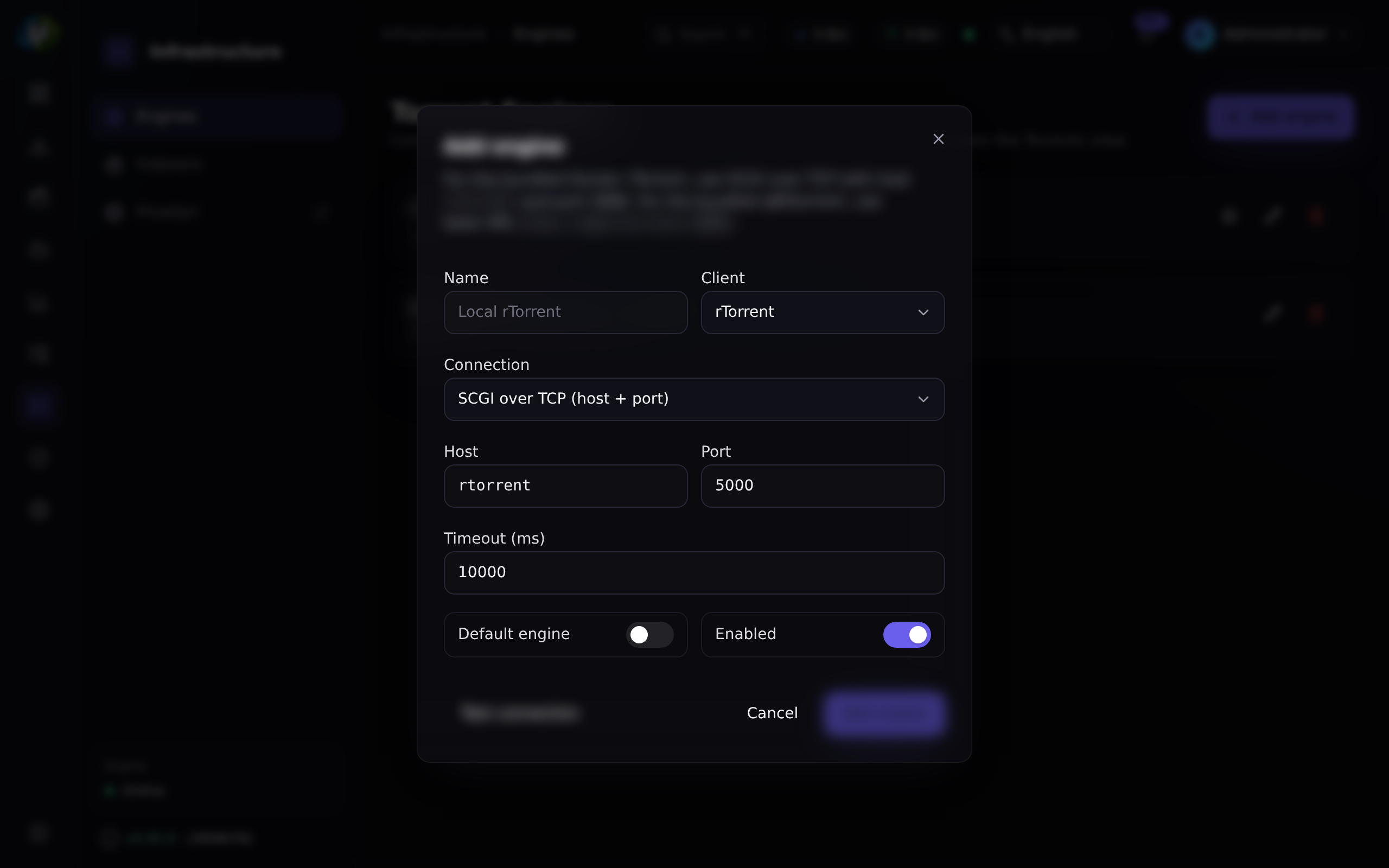
In the left-hand nav: Infrastructure → Engines → Add engine.
- Bundled rTorrent
- Bundled qBittorrent
- Your own rTorrent
| Field | Value |
|---|---|
| Client | rTorrent |
| Connection / mode | SCGI over TCP (scgi-tcp) |
| Host | rtorrent |
| Port | 5000 |
| Default engine | On |
Click Test connection → it should say Connected. Then Add engine.
| Field | Value |
|---|---|
| Client | qBittorrent |
| Base URL | http://qbittorrent:8080 |
| Username / password | The ones you set in the qBittorrent Web UI |
| Default engine | On |
If Test connection fails with a 401, turn off Enable Host header validation (or set Server domains to *) under qBittorrent's Options → Web UI — the backend connects by the service name qbittorrent, which that check rejects by default.
Enable an SCGI endpoint in your ~/.rtorrent.rc:
# SCGI over a TCP port (mode "scgi-tcp"):
network.scgi.open_port = 127.0.0.1:5000
# …or a Unix socket (mode "scgi-unix"):
# network.scgi.open_local = /var/run/rtorrent/rpc.socket
mode | Fields | rTorrent directive |
|---|---|---|
scgi-tcp | host, port | network.scgi.open_port |
scgi-unix | socketPath | network.scgi.open_local |
http | url | an HTTP→XML-RPC front end |
It grants full control of the client and the host user it runs as. Bind it to 127.0.0.1 or a Unix socket. Never expose it to a network or publish it from Docker.
9. Point the file browser at your downloads
If you did step 4: Settings → Default Root Path → choose /downloads.
Verification
Run these in order. Every one should look like the expected output.
All services up and healthy:
docker compose ps
NAME                       STATUS                    PORTS
ultratorrent-backend-1     Up 2 minutes (healthy)    4000/tcp
ultratorrent-frontend-1    Up 2 minutes (healthy)    0.0.0.0:8080->8080/tcp
ultratorrent-postgres-1    Up 2 minutes (healthy)    5432/tcp
ultratorrent-redis-1       Up 2 minutes (healthy)    6379/tcp
ultratorrent-rtorrent-1    Up 2 minutes (healthy)    5000/tcp
The API is alive (public endpoints, no auth needed):
curl -s http://localhost:8080/api/system/live
curl -s http://localhost:8080/api/system/ready
curl -s http://localhost:8080/api/system/version
/api/system/version returns the running version — the same string you should see in About.
The backend booted cleanly:
docker compose logs backend | tail -30
You want migrations applied and Nest listening — no insecure secret configuration, no P1000, no P1001.
The engine is online. In the UI, Infrastructure → Engines should show it green. The Torrents page should load an (empty) list rather than "Could not load torrents".
A real download. Add a torrent (a Linux ISO is the classic test) and watch the progress bar move without refreshing the page — that confirms the WebSocket connection works end to end. See Your first download.
Optional: accept inbound peers
The shipped Compose file publishes no peer port, so the bundled rTorrent makes outbound connections only. To accept inbound peers, publish its port range and forward it on your router:
# docker-compose.override.yml
services:
  rtorrent:
    ports:
      - "6890-6999:6890-6999/tcp"
Publishing a peer-port range is a standard BitTorrent practice, but it is not part of the shipped Compose file and is not exercised by the project's own deployments. Verify it behaves the way you expect on your host before relying on it, and remember that forwarding a port makes your client reachable from the internet.
Optional profiles
Everything optional is behind a Compose profile and off by default.
| Profile | Adds | Reach it at |
|---|---|---|
rtorrent | The bundled rTorrent engine | internal rtorrent:5000 (SCGI) |
qbittorrent | The bundled qBittorrent engine | http://<host>:8081, internal http://qbittorrent:8080 |
prowlarr | A Prowlarr indexer manager companion | http://<host>:9696, internal http://prowlarr:9696 |
flaresolverr | A Cloudflare solver Prowlarr can use for protected indexers | internal http://flaresolverr:8191 |
proxy | A Caddy edge reverse proxy with automatic TLS | :80 / :443 |
docker compose --profile rtorrent --profile prowlarr up -d --build
Auto-downloads (RSS rules, Smart Download, missing-episode acquisition) fetch the indexer's .torrent link over HTTP. The backend's SSRF guard blocks any URL that resolves to a private/internal address unless its host is listed in SSRF_ALLOW_HOSTS.
The stack defaults to SSRF_ALLOW_HOSTS=prowlarr, so the bundled Prowlarr works out of the box. Using a different self-hosted indexer (a Prowlarr or Jackett elsewhere on your LAN)? Add its host — and keep prowlarr if you also use the bundled one:
SSRF_ALLOW_HOSTS=prowlarr,indexer.lan,10.0.0.0/24
Without it, grabs fail with "Torrent URL resolves to a blocked internal address" and auto-downloads silently do nothing — even though the Prowlarr connection test still passes. That health check trusts private hosts; the torrent fetch is a separate, stricter guard.
The Compose file, service by service
postgres — postgres:17-alpine. Refuses to start without POSTGRES_PASSWORD (Compose's :? guard). Healthchecked with pg_isready; the backend waits for service_healthy. Data in postgres_data.
redis — redis:7-alpine with append-only persistence on. Cache and BullMQ job queues. Healthchecked with redis-cli ping. Data in redis_data.
backend — built from apps/backend/Dockerfile (multi-stage Node 22, runs as the unprivileged node user, uid 1000). Its DATABASE_URL is derived from POSTGRES_USER/POSTGRES_PASSWORD/POSTGRES_DB, so it can never drift from the database password — which is exactly why the password must be alphanumeric. It refuses to boot in production with weak, identical, or default secrets. Its command is prisma migrate deploy && node dist/main.js, so migrations apply on every start. expose: 4000 — not published to the host.
frontend — built from apps/frontend/Dockerfile onto nginx-unprivileged, which listens on 8080 inside the container. Published as ${FRONTEND_PORT:-8080}:8080. Its nginx config proxies /api/ to backend:4000 and /ws/ to backend:4000 with the WebSocket upgrade headers, so the browser only ever talks to one port. The API and WebSocket URLs are baked in at build time (VITE_API_URL=/api, VITE_WS_URL=/) as same-origin relative paths.
rtorrent (profile) — built from deploy/rtorrent/ around the jesec v0.9.8-r16 static binary. Serves SCGI on 0.0.0.0:5000 on the internal network only. Its entrypoint clears a stale rtorrent.lock from a previous crash, chowns /downloads/.session, and drops to PUID:PGID with gosu. It requests cap_add: [SETUID, SETGID] — those are part of Docker's default capability set, but some hosts (notably Synology DSM) strip them, which would make the privilege drop fail; re-adding them restores the default behaviour. Healthcheck: the SCGI port is listening.
qbittorrent (profile) — lscr.io/linuxserver/qbittorrent. Shares the same downloads volume so save-paths line up. Web UI published on QBITTORRENT_PORT (8081) so you can retrieve the first-run password.
prowlarr (profile) — lscr.io/linuxserver/prowlarr. A companion, not part of UltraTorrent; you link it under Settings → Integrations → Prowlarr. Its API key is entered in the UI and stored AES-GCM encrypted — never in .env.
flaresolverr (profile) — solves Cloudflare challenges for Prowlarr indexers. Gets shm_size: 256m because headless Chromium crashes with Docker's default 64 MB /dev/shm.
proxy (profile) — caddy:2-alpine, mounting deploy/Caddyfile. See Reverse proxy.
All services sit on one internal bridge network and address each other by service name — postgres, redis, backend, rtorrent, qbittorrent, prowlarr.
Reverse proxy
Not needed on a LAN — hit http://<host>:8080 and you are done.
Reachable from the internet, or you want a hostname and HTTPS? Put a proxy in front. The one hard requirement: /ws/ must be proxied with the WebSocket upgrade headers, or the UI loads but never updates live (no progress bars, no live torrent list).
Full, working configs for Traefik, NGINX, Nginx Proxy Manager, Caddy, HAProxy and Cloudflare Tunnel: Reverse proxy.
HTTPS
The fastest path is the bundled Caddy profile — replace the :80 site label in deploy/Caddyfile with your domain and it gets a Let's Encrypt certificate automatically:
docker compose --profile proxy up -d
Details, custom certificates, internal CAs and DNS-01 for split-horizon setups: TLS.
Updates
cd ultratorrent
docker compose exec -T postgres pg_dump -U ultratorrent ultratorrent > backup-$(date +%F).sql
git pull
docker compose --profile rtorrent up -d --build
docker compose exec backend npx prisma db seed        # picks up NEW permissions/settings
Migrations are forward-only and apply automatically on backend start. Always back up first. The full procedure, including rollback: Upgrading.
Backups
Back up two things:
# 1. The database — everything except the media itself
docker compose exec -T postgres pg_dump -U ultratorrent ultratorrent > ultratorrent-$(date +%F).sql

# 2. Your .env — you cannot decrypt stored 2FA secrets without ENCRYPTION_KEY
cp .env /somewhere/safe/ultratorrent.env.bak
redis_data is regenerable. downloads is your media — back it up on whatever schedule your media deserves. See Backup & restore.
Troubleshooting
| Symptom | Cause | Fix |
|---|---|---|
| Compose refuses to start: "POSTGRES_PASSWORD is required" | The :? guard in the Compose file fired | Set POSTGRES_PASSWORD (and ADMIN_PASSWORD) in .env |
| Backend exits at boot: "insecure secret configuration" | JWT_ACCESS_SECRET / ENCRYPTION_KEY unset, a known default, under 32 chars, or identical to each other | Generate strong, distinct values: openssl rand -base64 48 |
Backend crash-loops with Prisma P1000: Authentication failed | The postgres_data volume was first created with a different POSTGRES_PASSWORD. Postgres only applies the password on first init — later .env edits do nothing to an existing volume | If there is no real data yet: docker compose down -v && docker compose --profile rtorrent up -d --build. Also make sure the password is alphanumeric — a @, : or / breaks the derived DATABASE_URL |
P1001: Can't reach database server at postgres:5432 | You are running a manual install with a DATABASE_URL that points at the Docker service name | Point it at localhost — and make sure PostgreSQL is actually running |
| Web UI port already in use | Something else owns 8080 (very common on a NAS) | Set FRONTEND_PORT=18080 in .env and re-run up -d. Do not try to remap it with an override — Compose appends ports, so the old mapping survives and still clashes |
Backend crashes with Cannot find module '...' | A stale image missing a nested workspace dependency | docker compose up -d --build. If you customized the Dockerfile, make sure the runtime stage copies apps/backend/node_modules — npm does not always hoist |
| "Invalid username or password" right after install | You typed the email, or you never seeded | Log in with the username (admin). Run docker compose exec backend npx prisma db seed |
| Forgot / cannot use the admin password | The seed only sets the password when it first creates the admin — it never overwrites a later change | Reset it to the current .env value: docker compose exec backend node -e 'const argon2=require("argon2");const{PrismaClient}=require("@prisma/client");(async()=>{const p=new PrismaClient();const u=process.env.ADMIN_USERNAME||"admin";const h=await argon2.hash(process.env.ADMIN_PASSWORD,{type:argon2.argon2id});const r=await p.user.update({where:{username:u},data:{passwordHash:h,isActive:true}});console.log("reset:",r.username);await p.$disconnect()})().catch(e=>{console.error(e.message);process.exit(1)})' |
"Could not load torrents" / /api/engines/health → online: false | No engine configured, or SCGI unreachable | Add the engine (Infrastructure → Engines, rTorrent / scgi-tcp / host rtorrent / port 5000) and use Test connection. The bundled engine only exists if you started with --profile rtorrent |
| Auto-downloads do nothing; grabs fail with "resolves to a blocked internal address" | The SSRF guard blocked a private-IP .torrent link | Add the indexer's host to SSRF_ALLOW_HOSTS and recreate the backend |
| "The app process cannot write to this path" on Default Root Path | The folder is not writable by uid 1000 | Plain folder → chown -R 1000:1000 <folder>. Owned by another app (Plex) → do not chown; set PUID/PGID and optionally group_add the backend (see Permissions) |
| rTorrent crash-loops: "Could not lock session directory" | A stale rtorrent.lock from a previous crash | Current images clear it automatically — rebuild. By hand: rm -f <downloads>/.session/rtorrent.lock |
rTorrent restarts periodically; logs show priority_queue_insert(...) called on an invalid item | The unfixed upstream rTorrent 0.9.8 bug. Frequency scales with active-torrent count | Nothing is lost — it auto-restarts and reloads its session. Reduce active torrents, or switch to the qBittorrent profile for a large library |
rTorrent crashes with DhtServer::event_write … both write queues are empty | A DHT bug in this rTorrent build — which is why DHT is off by default | Set RT_DHT=off in .env and recreate. Trackers + PEX still find peers |
| UI loads but nothing updates live | The WebSocket never connected — usually /ws/ is not proxied with Upgrade/Connection headers | Fix your reverse proxy — see Reverse proxy |
| Build gets OOM-killed | Under ~2 GB of free RAM | Free memory, or add swap, and rebuild |
More: Troubleshooting.
Best practices
- Generate every secret separately. Three
openssl rand -base64 48runs, three different values.ENCRYPTION_KEYmust not equalJWT_ACCESS_SECRET— the backend checks. - Keep
POSTGRES_PASSWORDalphanumeric. The derivedDATABASE_URLis not URL-encoded. - Bind-mount downloads to a real folder on a big filesystem, not a Docker volume you cannot browse.
- Never publish the SCGI port (5000). It is unauthenticated remote control.
- Never publish the backend (4000) unless you specifically need direct API access — the frontend already proxies it.
- Back up before every upgrade. Migrations are forward-only.
- Prune old images occasionally:
docker image prune -f. - Change
FRONTEND_PORTrather than fighting a port clash with an override file. - Pick the engine that matches your library size — rTorrent for modest, qBittorrent for large.
- Do not expose it to the internet without a reverse proxy and HTTPS. See Security.
FAQ
Do I have to run --build?
Yes, at least once — no images are published, so the first up must build them. Afterwards, docker compose up -d reuses the built images; you only need --build again after pulling new code.
Do I need to seed after every upgrade? Re-running the seed is recommended — it picks up new permissions, roles and settings introduced by the release. It is idempotent and never resets your admin password.
Where is the API documentation?
Swagger is served at /api/docs in non-production builds. The reference lives at API.
Can I expose the backend directly?
Yes — add ports: ["4000:4000"] to the backend service. You rarely need to; the frontend proxies /api/ for you.
Can I run only Postgres and Redis in Docker, and the apps from source?
Yes: docker compose -f docker-compose.dev.yml up -d publishes just those two. See Linux → manual install.
Do the containers auto-update? No. Updating means pulling new source and rebuilding — see Upgrading.
Checklist
- Docker Engine + Compose v2 present (
docker compose versionprints v2.x) - Source cloned;
cp .env.example .envdone -
POSTGRES_PASSWORDset — alphanumeric only -
ADMIN_PASSWORDset -
JWT_ACCESS_SECRET,JWT_REFRESH_SECRET,ENCRYPTION_KEYgenerated — three distinct 48-byte values -
ENCRYPTION_KEY≠JWT_ACCESS_SECRET -
FRONTEND_PORTfree on this host - Downloads bind-mounted to a real folder (optional but recommended), and that folder exists
-
PUID/PGIDset if the download folder belongs to another app -
docker compose --profile <engine> up -d --buildcompleted -
docker compose exec backend npx prisma db seedrun once -
docker compose psshows everythinghealthy -
curl http://localhost:8080/api/system/liveresponds - Logged in as
admin(the username) - Engine added and Test connection returns Connected
- Default Root Path set to
/downloads - A test torrent downloads, with the progress bar moving live
-
.envand apg_dumpbacked up somewhere safe
See also
- Choose your install method — the decision tree
- Platform deltas — Linux, Synology, QNAP, Unraid, TrueNAS, Portainer, Proxmox, cloud
- Reverse proxy · TLS · Upgrading
- Environment variables — the generated reference
- Engines · Prowlarr · Torrents
- Quick start · Your first download
- Backup & restore · Security · Performance